Welcome to Sphinx Cheat Sheet
Add code extract :
.. code-block:: <language>

    Code must be one indent more that the code-block tag, and
    separated by a blank line.

    This very text is an example. Replace <language> by "none"
    to avoid color highlighting.
Add in-line code extract
``this will show as an in-line code extract``
This won't.
Add a local content table of content
.. contents:: :local:
Add an image
.. image:: image.png
Add an image with link to see it full size
.. image:: _static/image.png
    :target: _static/image.png
Add a simple table
=========================== ===========================
Test title 1                Test Title 2
=========================== ===========================
Row 1 Col 1                 Row 1 Col 2
Row 2 Col 1                 Row 2 Col 2
Row 3 Col 1                 Row 3 Col 2
=========================== ===========================
Add a numbered list
#. Something
#. Something else
#. Another thing
#. etc...
Add a bullet list
* Something
* Something else
* Another thing
* etc...
Cross-referencing arbitrary locations inside the document
Place the following code on top of the target :
.. _my-reference-label:
The use :ref: like this :
...bla bla bla, see :ref:`my-reference-label`.
Example : …bla bla bla, see Add in-line code extract.
Render math formulas as images (uses LaTeX)
- Install a latex distrib (Windows : Miktex for example)
- In
conf.pyadd the corresponding extension :
# Add any Sphinx extension module names here, as strings. They can be
# extensions coming with Sphinx (named 'sphinx.ext.*') or your custom
# ones.
extensions = [
    'sphinx.ext.imgmath'
]
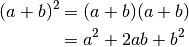
- Add Latex-like math formulas like this :
.. math::

   (a + b)^2  &=  (a + b)(a + b) \\
              &=  a^2 + 2ab + b^2
Result :
.. math::
   :nowrap:

   \begin{eqnarray}
      y    & = & ax^2 + bx + c \\
      f(x) & = & x^2 + 2xy + y^2
   \end{eqnarray}
Result :

.. math:: e^{i\pi} + 1 = 0
   :label: euler
Result :
(1)
Euler's identity, equation :eq:`euler`, was elected one of the most beautiful mathematical formulas.
Result :
Euler’s identity, equation (1), was elected one of the most beautiful mathematical formulas.
Inline equations :
Since Pythagoras, we know that :math:`a^2 + b^2 = c^2`.
Result :
Since Pythagoras, we know that  .
.